
How to Add Nearby Amenities to Aerial Property Photos
Learn how to highlight nearby schools, parks, shops and transport on aerial property photos to create more informative real estate marketing images.
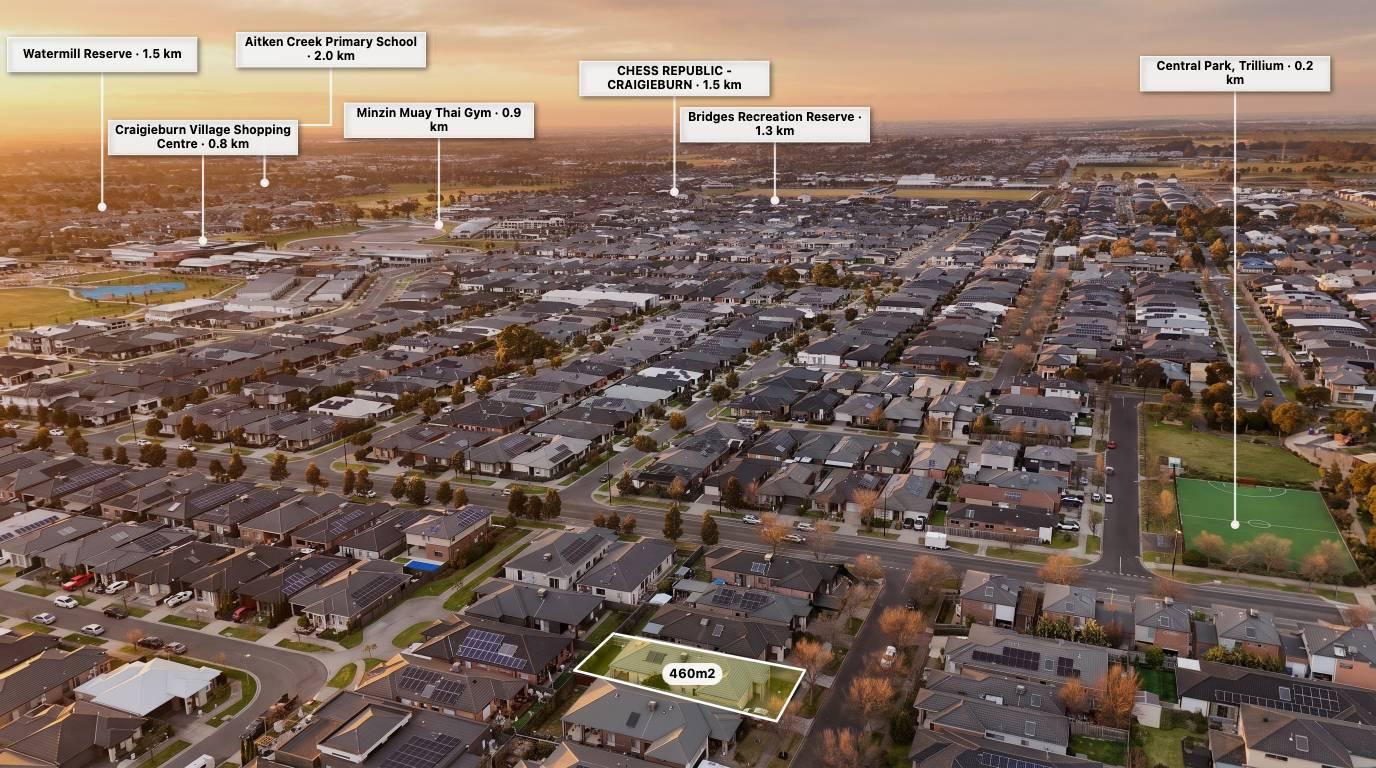
Location is one of the most important parts of buying property.
Potential buyers often want to know how close a home is to schools, shopping centres, parks, public transport and other everyday amenities.
While property listings usually include a written location description, an annotated aerial photograph can communicate this information visually.
Adding nearby amenities to aerial imagery helps buyers understand the surrounding area at a glance.
Which nearby amenities should you highlight?
The best locations to include depend on the property and its target audience.
Schools and education
Highlight nearby primary schools, secondary schools, childcare centres and universities where relevant.
Shopping and retail
Show shopping centres, supermarkets, local shopping strips and essential retail services.
Parks and recreation
Identify parks, sporting facilities, walking tracks, playgrounds and recreational areas.
Transport and access
Highlight train stations, bus routes, major roads and other relevant transport connections.
Local services
Depending on the property, you may also want to identify medical centres, hospitals and community facilities.
Always verify the location and relevance of each point before publishing.
How to add nearby amenities to aerial property photos
Step 1: Upload your aerial image
Choose a photograph that shows the property and enough of the surrounding area to make nearby locations meaningful.
Step 2: Identify nearby points of interest
Research the amenities around the property.
Use reliable mapping sources to confirm the correct location and name of each place.
Step 3: Add location pins
Use different icons or pin styles to identify schools, parks, shops and other points of interest.
Try to keep the pin design consistent throughout the image.
Step 4: Add labels and distances
Add a short name for each location and, where appropriate, a distance measurement.
Make sure you clearly distinguish straight-line distances from road or walking distances.
Step 5: Review the layout
Avoid placing too many labels over the property or covering important visual details.
Choose only the amenities that genuinely help communicate the property's location.
Using AerialPin to show nearby amenities
AerialPin includes a Nearby Search feature designed to help users find nearby places and add location information to aerial property imagery.
You can use nearby search to discover relevant points of interest, then customise the pins and labels to suit the image.
AerialPin also offers Auto Place, which can use supported drone GPS, heading and camera information to help position nearby location pins.
The result is an aerial photograph that communicates more than just the property's appearance.
Explore AerialPin Nearby Search.
Why nearby amenity annotations matter
For real estate agents, location annotations can help present the surrounding neighbourhood in a more visual way.
For photographers, they can become an additional service that adds value to a standard aerial photography package.
For buyers, they can provide a useful starting point for understanding the property's surroundings.
Remember to verify locations, distances, access and any claims about nearby facilities before including them in marketing material.
Frequently asked questions
Can I show nearby schools on an aerial property photo?
Yes. You can add location pins and labels to identify nearby schools and other relevant amenities.
Can I automatically find nearby amenities?
Some online tools can search for nearby points of interest using geographic location information.
Can I add distances to nearby shopping centres?
Yes. You can add distance labels, but make sure you specify whether the distance is straight-line or follows an actual route.
What amenities should real estate agents highlight?
Schools, parks, shopping centres, transport and local services are common examples. Choose amenities that are relevant to the property and its likely buyers.